
Welcome to our guide on how to roam MTN. MTN is a leading telecommunications network in many African countries, offering reliable voice and data services to millions of people. Roaming is the ability to use your MTN SIM card to make and receive calls, send and receive messages, and access the internet while you are traveling abroad. This guide provides step-by-step instructions on how you can roam MTN the easy way.
Step 1: Check Whether Your MTN SIM Card can Roam
The first step in roaming MTN is to make sure that your MTN SIM card can roam. Not all MTN SIM cards can roam, so it is important to check before you travel. You can check by calling MTN customer care or visiting the nearest MTN service center. If your SIM card is not eligible for roaming, you may need to get a new one.
Step 2: Activate Roaming on Your MTN SIM Card
Once you have confirmed that your MTN SIM card is eligible for roaming, the next step is to activate roaming on your SIM card. This can be done in several ways:
Option 1: Activate Roaming via SMS
You can activate roaming on your MTN SIM card by sending an SMS with the word ‘Roam’ to 131. You will receive a confirmation message once roaming is activated.
Option 2: Activate Roaming via MTN Mobile App
You can easily activate roaming on your MTN SIM card by downloading and installing the MTN mobile app. Once installed, log in and navigate to the roaming settings to activate roaming.
Step 3: Check Your Account Balance
Ensure that you have enough airtime on your MTN account to be able to make and receive calls, send and receive messages, and access the internet while roaming. You can check your account balance by dialing *556#. This code will show you the balance and the validity of your account.
Step 4: Choose a Roaming Partner
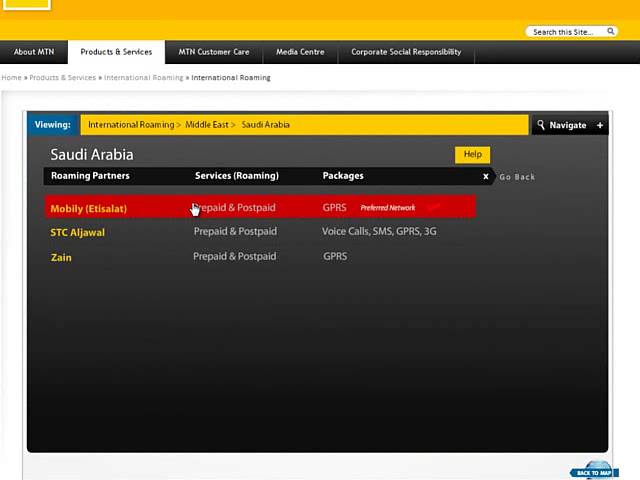
MTN has partnered with various telecommunication companies in different countries to enable seamless roaming services. By partnering with these networks, MTN customers can enjoy stable, fast, and affordable roaming services while traveling abroad. To find an MTN roaming partner, visit the MTN website or get in touch with customer service.
Step 5: Enjoy Your Roaming Services
Once you have activated roaming on your MTN SIM card, ensured you have enough airtime, and have selected a roaming partner, you can now enjoy your roaming services. Be sure to check the rates and tariffs, especially for data usage, so you are not caught by surprise with an expensive bill when you come back home. You can keep track of your usage by regularly checking your account balance through the *556# code.
Roaming with MTN is simple and convenient. With these easy steps, you can stay connected with family, friends, and business associates while on your trip abroad.
