
Capitec is one of the leading banks in South Africa, it has introduced the Capitec app which is designed to make banking more convenient for its customers. One of the important features of this app is the ability to get proof of banking, which can come in handy in different situations. In this article, we will guide you on how to get proof of banking on the Capitec app.
Step 1: Login to the Capitec App
The first step is to login to the Capitec app. If you don't have the app, you can download it from the Google Play Store or Apple App store.
Step 2: Select the Account
Once you are logged in, select the account for which you require the proof of banking. You can choose either a savings or a current account.
Step 3: Click on Transactions
After selecting the account, click on the "transactions" button. It will take you to the transaction history of that account.
Step 4: Choose "Proof of Account"
On the transaction page, you will find an option "Proof of Account". Click on the option and select the time frame for which you need the proof of account. You can choose the time frame of up to three months.
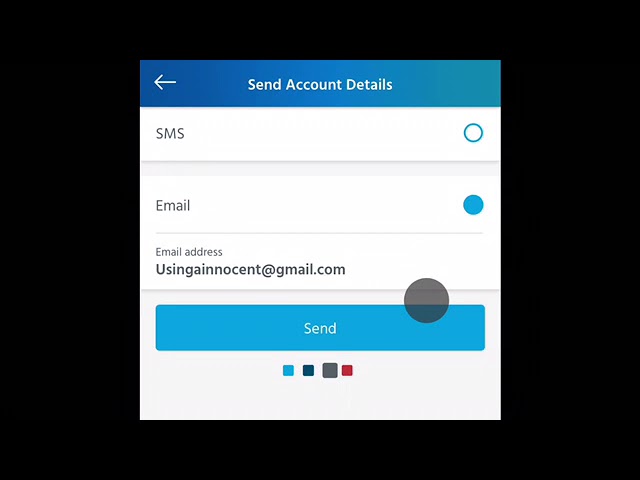
Step 5: Enter the Email Address
In the next step, enter the email address where you want to receive the proof of account. This can be any email address; it doesn't necessarily have to be the one linked with your Capitec account.
Step 6: Verify the Details and Click "Send"
Verify all the details carefully before sending the proof of account. Once you are satisfied that all the details are correct, click on the "send" button.
Why is Proof of Banking Useful
Proof of banking can be useful in various situations including job applications, applying for credit cards, or applying for loans. It can also be useful if you want to keep a record of your banking activities for future reference.
Conclusion
Getting proof of banking on the Capitec app is a hassle-free process that can be done in just a few clicks. It is a useful feature that can come in handy in different situations. So, the next time you need proof of banking, remember to use the Capitec app for a quick and convenient process.
